Workspace User Guide
The workspace is the core working area of BEKEN LVGL UI Designer. This guide provides detailed information about the functions and usage of each module in the workspace.
📐 Workspace Layout
The workspace is divided into 5 main functional areas:
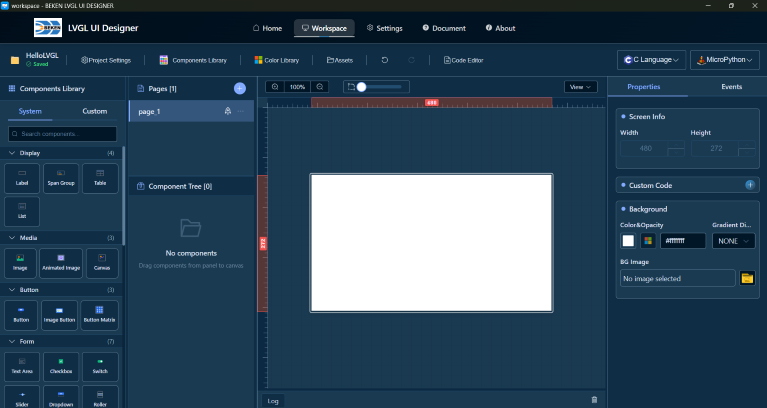
Five Main Areas
- Canvas Area - Core area for visual design
- Component Library - Rich UI component library
- Component Tree - Component hierarchy management
- Properties Panel - Property and style editing
- Event System - Component interaction event configuration
- Multi-language Feature - Multi-language configuration and usage
- Timeline Animation - Animation tracks and keyframes
- Custom Characters - Custom character configuration and management
- Custom Code - In-designer custom code and external IDE regions
- Toolbar - Project management, resource management, preview, and common functions
- Archives and History - Save the current version, inspect archives, and restore versions
- AI Design - Design UI with AI tools
Keyboard Shortcuts
For a complete list of keyboard shortcuts, please refer to the Shortcuts documentation.
📚 Detailed Documentation
Click the links below to view detailed instructions for each module:
Core Function Modules
- 🎨 Canvas Area
- View control (zoom, pan, grid)
- Rulers and guidelines
- Component operations (add, select, move, resize)
-
Component alignment, layering, locking and hiding
- System component library (30+ components)
- Component categories and search
-
Create and use custom component library
- Page management (create, switch, delete, rename)
- Component hierarchy display
-
Component operations (select, rename, drag and reorder)
- Basic property editing
- Style editor (parts, states)
-
Style library functions
- Event editor usage
- Event types and action types
-
Event configuration and examples
- Enable multi-language in project settings
- Configure languages and translations in asset manager
- Enable translation in component properties
-
Use multi-language in event actions
- Manage animation tracks and keyframes
- Configure property changes over time
- Preview and tune animation behavior
-
Trigger animations through events
- Enable/disable custom characters feature
- Configure characters and character ranges
- FontAwesome icon support
-
Sync function to auto-generate configuration
- In-designer: page, event, call function
- External IDE:
BEKEN_USER_CODEregions -
Code Editor editable scope
- Project information and save status
- Edit operations (undo/redo)
- View control
- Resource manager
-
Preview and code generation
- Save the current project version
- Inspect archived versions and switch pages in preview
-
Restore to a selected archived version
- Launch Cursor / Codex / TRAE / TRAE CN from the toolbar
- MCP and Skill environment setup
- Describe UI requirements in natural language
- Confirm changes and troubleshooting
Other
- ⌨️ Keyboard Shortcuts
- General operation shortcuts
- Component operation shortcuts
- Component adjustment shortcuts
Related Documents: Back to Home | Getting Started | FAQ